Photo app development for iPhone, from the team behind three photo apps
We design and build iPhone apps that turn a photo into something new: headshots, styled shoots, avatars and virtual try-ons. Three of our own apps do exactly that, so the hard parts, from consent to credits, are parts we have already built.
- Timeline
- 8–16 weeks
- Our own photo apps
- Three, built and run in-house
Who it is for
01
Who this is for
- 01
AI photo products
Headshots, portraits, avatars or try-on: a model that changes a photo, and the iPhone app that makes it simple and trustworthy.
- 02
Brands adding try-on
Let customers see a product on themselves before they buy, in an app that is honest about what the image is.
- 03
Camera and editing apps
Capture, edit and share, built on Apple’s camera and photo frameworks so it feels like part of the iPhone.
What you get
02
What you get, and how it runs
Typical timeline: 8–16 weeks.
- 01A native photo app built in Swift and SwiftUI
- 02Camera, photo library and the system photo picker
- 03Consent and disclosure before any photo is uploaded
- 04Generation flows with progress, retries and refunds on failure
- 05Credits or subscriptions on in-app purchase
- 06Results saved on the device, ready to share
- 01
Discovery
The transformation, the model behind it, the cost of each result and what v1 includes. A written scope and a fixed quote.
- 02
Architecture
Where photos go, how long anything is kept, and how results come back, planned before we build.
- 03
Development
Swift and SwiftUI in two-week sprints, with a TestFlight build every week.
- 04
Launch
App Store submission with the privacy answers ready, review support, and 30 days of support.
What photo apps have to get right
03
What photo apps have to get right
A photo app handles the most personal data on a phone: faces. These are the four things we plan first, all of them visible in our own apps.
Ask for less
Apple asks apps to use the out-of-process photo picker where possible instead of full library access (guideline 5.1.1). People choose one photo; the app sees one photo.
Consent before upload
If a photo goes to a third-party AI service, say so and ask first (guideline 5.1.2(i)). In JobShot, cancelling means no photo data leaves the device.
Keep nothing you do not need
Delete uploads after processing and keep results on the phone. Face data from camera or photo APIs may not be used for marketing or data mining (guideline 5.1.2(vi)).
Results people trust
Templates instead of prompts, examples before the spend, and an honest note when an image is a visualisation rather than a promise.
Our own apps
04
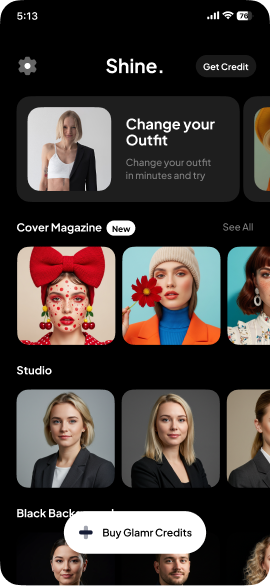
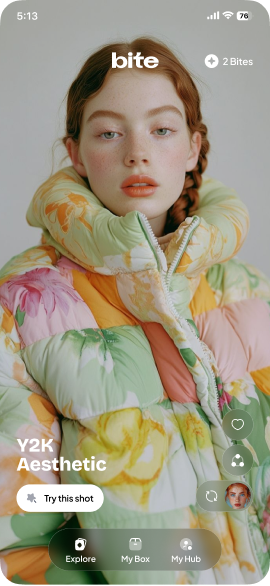
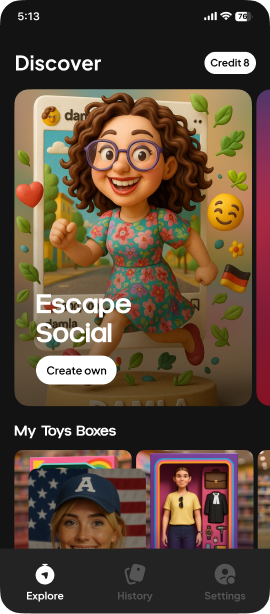
The same team runs five apps of its own
Designed, built and operated in-house, in Swift and SwiftUI. What we learn running them goes into the apps we build for you.
Questions
05
Questions about photo apps
Not covered here? Write to hello@pull.house.
Three of our own: JobShot for headshots and outfit try-on, Bite for styled photo shoots and AI Avatar for cartoon avatars. Each has a case study on this site.
From our guides
06
Related services
07
Contact
08
Have an iOS app to build?
Tell us what you are making. If we are not the right team for it, we will say so.