The brief
A good photo shoot has two parts: a look and a frame. The look is the styling, the light and the mood; the frame is the pose and the composition. Bite gives people both without a photographer, for profile photos, social posts and creative projects.
Two choices instead of a blank page
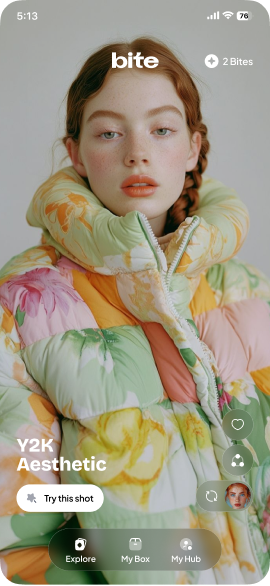
Bite turns photography into two decisions. Style presets set the look of the shoot. Shot templates set the framing and the pose. Between them they describe a finished image well enough for generation to follow, without asking anyone to write a prompt or understand lighting.
Splitting the choice in two also widens the range: a look and a frame chosen separately describe far more shoots than either list could on its own.
Three steps
- Upload a photo.
- Choose a style.
- Generate the image, then save or share it.
That is the whole app, on purpose. Each extra screen between a photo and a result is a place where people stop. Bite spends its design effort on making those three steps fast and obvious on an iPhone, rather than on adding a fourth.
Free to start, metered after
Bite is free to try: people can generate their first images without paying, and buy more when they want more options. Beyond that, generations are metered with credits, bought through Apple’s in-app purchase. Metering per generation keeps the price tied to what each image costs to make, which is the arithmetic every AI photo app has to get right. More in what an AI app costs to run.
Natural results
The listing’s promise is realism: natural facial details, balanced light and clean composition, so portraits look like photographs rather than filters. In a template-driven app, most of that quality is decided by the templates themselves. Curating them is product work as much as engineering.
What we would bring to a project like it
- Break a creative decision into two simple ones. A look and a frame are easier than a prompt.
- Count the steps from photo to result, and remove every one you can.
- Let people try before they pay, then meter by what each result costs.
- Treat the template library as the product. Its quality is the app’s quality.
Related: Photo app development · AI app development · Onboarding best practices